
LMI Octane Pipeline tools
Tools to Streamline your day to day assembly tasks in Octane Standalone. Build libraries, transfer data. Efficiently.



Current version 1.1.0

Description
The only core tools you need to enable efficient assembly workflow with Octane Standalone. These tools remove friction and enable efficiency. Operating in preferable and optimised formats.
Features

LMI Octane Pointbaker
Pointbaker is purpose-built for our Octane Standalone–centric assembly pipeline. It takes incoming point data from Houdini, normalizes transforms into an Octane-friendly form, and exports a lightweight, drag-and-drop bundle ready for Standalone.
This is a major revision of the original baker. The exporter is now C++ accelerated, delivering a massive performance jump and making high-density, animated point workflows genuinely practical. Animation is first-class: Pointbaker preserves per-frame transforms cleanly and is designed so motion and motion blur evaluate efficiently at render time, keeping playback and iteration responsive.
Unlike previous iterations that produced multiple separate outputs, Pointbaker now exposes multiple variants as pins on a single node, so you can route and swap content cleanly inside Standalone without nodes overflow.
Under the hood it exports an OMPX bundle: high-throughput binary caches (.bin), optional attribute atlases (.exr), and a .lua manifest that builds a clean two-layer graph in Octane for a polished user experience.
This leap forward is made possible thanks to the OMPX Lua loader code developed by Padi Frigg, which we build on, extend and super-charge for production use.
- Octane Standalone-ready export via a single drag-and-drop .luaC++ exporter for high-throughput baking (dozens-of-times faster vs earlier versions)
-
- Animation-friendly: robust transform capture across frame ranges, clean motion blur evaluation
- Variant pins, not variant files: multiple variants exposed through one graph for tidy assembly
- Auto-extracted Point attributes with predictable naming

LMI Octane Library
Library Processor automates the boring, painful part of building production libraries: converting thousands of raw assets (Megascans, kitbash props, internal scans, you name it) into optimised, consistently structured Octane OCS libraries.
Pick the collection you want in your library, hit "Export OCS" and the tool handles the full assembly: asset ingest, cleanup, shader creation, texture discovery, Octane Universal wiring, Alembic export (because Standalone wouldn't take .fbx), and finally OCS library generation with a predictable hierarchy. The result is a library that’s pipeline-ready, easy to version, and safe to deploy across a studio environment.
This is a deliberate shift from our legacy approach (tools like LMI OctaneShotManager) where assets were baked into ORBX. ORBX can still be useful, but it’s not always desirable depending on how your studio manages storage, syncing, and references.
Today we’re OCS-centric, with optional ORBX archiving as an automated post-step (separate scripts) when you actually need a packaged deliverable.
This is also our preferred internal tool going forward, and it’s under active development, including planned batch processing workflows for high-volume library builds and updates.

LMI Octane Shot Manager (Legacy)
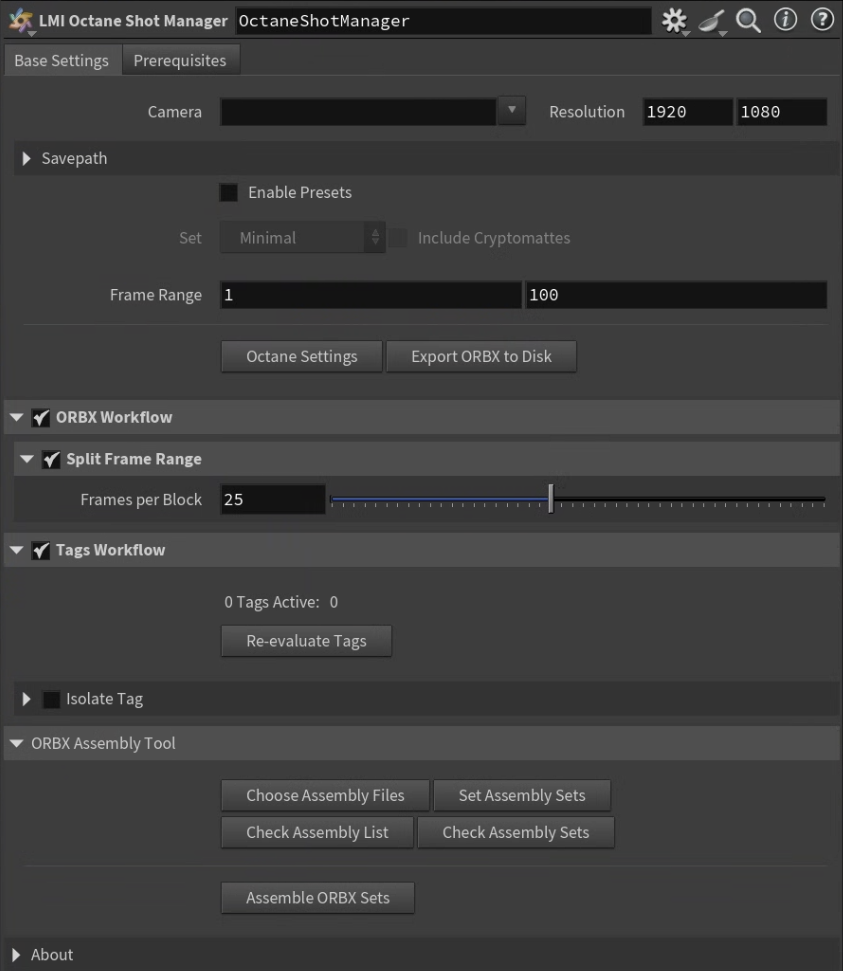
The Octane Shot Manager significantly enhances the user experience when working with the Octane Render Engine. We’ve removed all the technical hassle typically associated with Solaris and minimized the amount of user input required. In fact, all you need to do is specify the camera - renders will go straight to your hard drive. (In the standard workflow, multiple nodes must be set up before Octane will render.)
ORBX Management.
We’ve also built the first comprehensive ORBX manager. Baking complex scenes into a single ORBX file was previously limited by machine resources. Once the scene reached a certain complexity, baking would fail. Additionally, when working with Render Network, keeping file sizes manageable is critical.
With Octane Tags, users can export individual scene elements with a single click. Each tag is evaluated and exported as its own ORBX file, bypassing system resource limitations. This gives you the freedom to export exactly what you need.
To further manage file sizes, we’ve introduced frame-splitting functionality. Whether or not you use tags, sequences can be split into frame blocks, reducing the size of each exported ORBX. Once the export is complete, all components can be merged into a single, optimized ORBX containers.
The ‘Octane Shot Manager’ significantly enhances the user experience when working with the Octane Render Engine. We’ve removed all the technical hassle typically associated with Solaris and minimized the amount of user input required. In fact, all you need to do is specify the camera - renders will go straight to your hard drive.
Licensing
Tools are provided under a worldwide, non-exclusive license for use in any production context. You may install and use the toolset for any lawful purpose, including commercial work, client deliveries, internal studio pipelines, and distributed production environments.
All software is provided “as is”, without warranty of any kind, to the maximum extent permitted by applicable law.
Digital purchases are final and non-refundable, except where a refund is required by applicable consumer protection law.